
| Page: |
| Home > General Chat > PC file sharing help? | |||||||
|
Forum Mod  4828 Posts Member #: 154 Post Whore Midlands |
27th Jul, 2009 at 10:47:43pm
any IT bods out there who can help me please or point me in the direction of a site with a numptys guide?
On 20th Oct, 2015 Tom Fenton said:
Well here is the news, you are not welcome here, FUCK OFF. |
||||||
 1252 Posts Member #: 1656 Post Whore stoke-on-trent |
27th Jul, 2009 at 10:50:11pm
should be able to do it through your network if you share the drive on the pc, then you can remotely access it. cant remember the exact process - its ages since i did it. sorry mate On 23rd Oct, 2009 sim_ou_nao said:
eu gosto de mamas = i like boobs |
||||||
|
Site Admin  6297 Posts Member #: 1 The boring bloke who runs this place. Berkshire |
27th Jul, 2009 at 11:04:11pm
Right click > share folder
|
||||||
|
Forum Mod 4828 Posts Member #: 154 Post Whore Midlands |
27th Jul, 2009 at 11:16:27pm
i'm halfway there, went into a windows wizard thing to setup a workgroup. gave my laptop and pc the same workgroup name etc.
Edited by Nick on 27th Jul, 2009. On 20th Oct, 2015 Tom Fenton said:
Well here is the news, you are not welcome here, FUCK OFF. |
||||||
|
Site Admin 6297 Posts Member #: 1 The boring bloke who runs this place. Berkshire |
27th Jul, 2009 at 11:34:57pm
nono, computer_name = whatever you called your computer
|
||||||
|
Site Admin 6297 Posts Member #: 1 The boring bloke who runs this place. Berkshire |
27th Jul, 2009 at 11:35:15pm
arse. just 2.
|
||||||
|
Forum Mod 4828 Posts Member #: 154 Post Whore Midlands |
27th Jul, 2009 at 11:37:18pm
yeah i figured it was the actual computer name, i'm not *that* much of a noob lol.
On 20th Oct, 2015 Tom Fenton said:
Well here is the news, you are not welcome here, FUCK OFF. |
||||||
|
Forum Mod 4828 Posts Member #: 154 Post Whore Midlands |
27th Jul, 2009 at 11:41:08pm
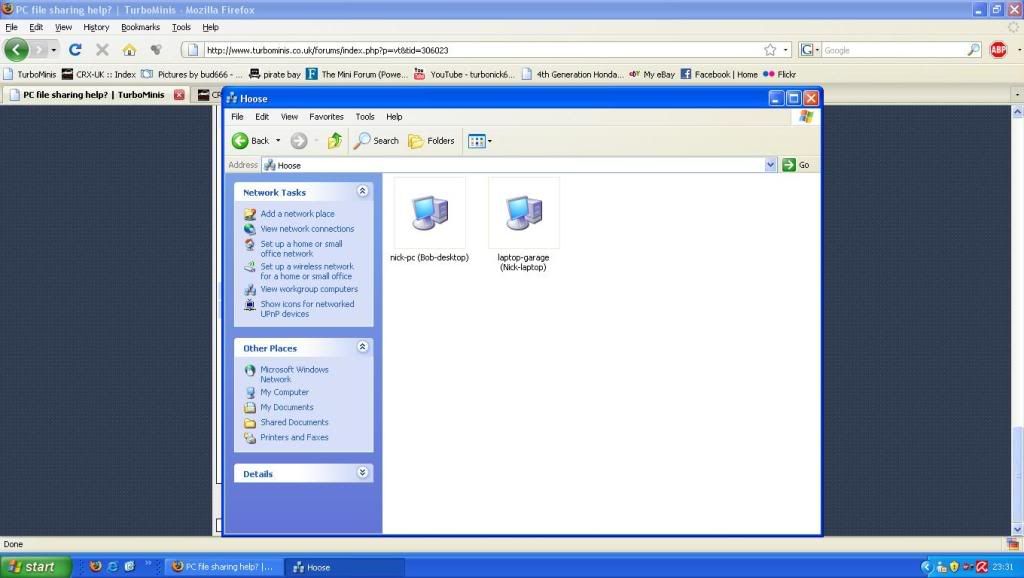
here's what i've got on the pc
On 20th Oct, 2015 Tom Fenton said:
Well here is the news, you are not welcome here, FUCK OFF. |
||||||
 998 Posts Member #: 2178 Post Whore Leyland, Lancs |
28th Jul, 2009 at 08:24:31am
Check that file and printer sharing are turned on on the desktop. On 15th Jul, 2009 fastcarl said:
a breif struggle ensued but Will emerged the victor with a pair of undies in his possesion On 21st Sep, 2009 apbellamy said:
No, but you did chuck your guts up over my front gate the Saturday before! You even managed to get a bit in your arm pit... |
||||||
| Home > General Chat > PC file sharing help? | |||||||
|
|||||||

| Page: |