Page:
Home > Help Needed / General Tech Chat > Computer woes (Trojan/worm/virus in my processes?)

joeybaby83

User Avatar

6274 Posts
Member #: 509
Post Whore

Isle of Man

Help!

My comp is running diabolically slow, in fact, im waiting right now for my text to catch up with me, groan...

Ive been looking at an few threads on here, and thought id

1: delete all my porn (well most)

2: uninstall a shit load of suff im not using

3: google all my processes and see what they are

well all was going great, deleted loads of the fuckers, but now have 2 that i think might be a problem?

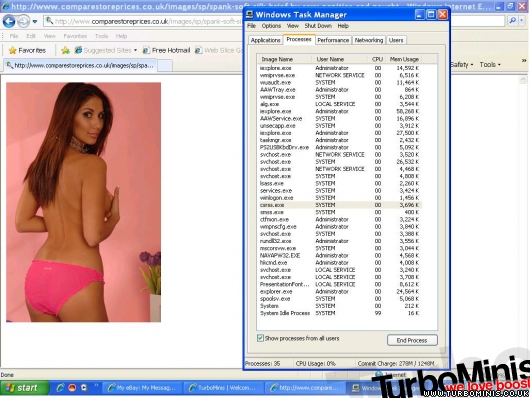
csrss.exe
lsass.exe

like below:


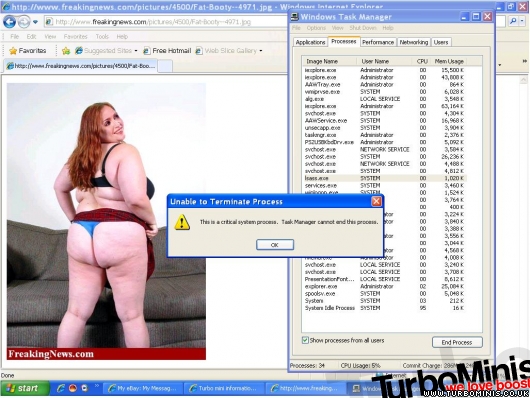
but, when i try to close them down i get this:


so what do you guys think I should do? Norton isnt picking them up, and neither is ad-aware or search and destroy?

plus, my computer is still fucking slow as, so i paid £19.99 for this thing called "speedupmypc", which looked great, and found twelvetyseven things wrong that it could optimise, so i optimised them, and yes..... ITS STILL FUCKING SLOW!!!

Its doing my head in and my laptops mother board went last month, so got no choice but to try and fix it!!

Help me!

Cheers Joe

"Turbo's make torque, and torque makes fun"

"did you know you can toast potato waffles?"


evolotion

User Avatar

2909 Posts
Member #: 83
Post Whore

Glasgow, Scotland

quite sure there normal system processes. an deleting the porn never helps, just keep it :)

het HijackThis! and start going through its log :)

turbo 16v k-series 11.9@118.9 :)

Denis O'Brien.


James_H

User Avatar

3692 Posts
Member #: 1833
Formally mini_majic

Auckland, New Zealand


On 27th Jul, 2009 evolotion said:
:)

het HijackThis! and start going through its log :)


Fettish?


joeybaby83

User Avatar

6274 Posts
Member #: 509
Post Whore

Isle of Man

Bat, er, yup, all good?

Logfile of Trend Micro HijackThis v2.0.2
Scan saved at 23:14:16, on 27/07/2009
Platform: Windows XP SP3 (WinNT 5.01.2600)
MSIE: Internet Explorer v8.00 (8.00.6001.18702)
Boot mode: Normal

Running processes:
C:WINDOWSSystem32smss.exe
C:WINDOWSsystem32winlogon.exe
C:WINDOWSsystem32services.exe
C:WINDOWSsystem32lsass.exe
C:WINDOWSsystem32svchost.exe
C:WINDOWSSystem32svchost.exe
C*tongue*rogram FilesLavasoftAd-AwareAAWService.exe
C:WINDOWSsystem32spoolsv.exe
C:WINDOWSExplorer.EXE
C:WINDOWSsystem32hkcmd.exe
C*tongue*ROGRA~1NORTON~1navapw32.exe
C:WINDOWSsystem32rundll32.exe
C*tongue*rogram FilesWindows Media PlayerWMPNSCFG.exe
C:WINDOWSsystem32ctfmon.exe
C*tongue*rogram FilesMultimedia Keyboard DriverPS2USBKbdDrv.exe
C:WINDOWSMicrosoft.NETFrameworkv2.0.50727mscorsvw.exe
C:WINDOWSSystem32svchost.exe
C*tongue*rogram FilesInternet Exploreriexplore.exe
C*tongue*rogram FilesLavasoftAd-AwareAAWTray.exe
C:WINDOWSSystem32svchost.exe
C*tongue*rogram FilesInternet Exploreriexplore.exe
C*tongue*rogram FilesMSN Messengermsnmsgr.exe
C*tongue*rogram FilesMSN Messengerusnsvc.exe
C*tongue*rogram FilesTrend MicroHijackThisHijackThis.exe

R0 - HKCUSoftwareMicrosoftInternet ExplorerMain,Start Page = about:blank
R1 - HKLMSoftwareMicrosoftInternet ExplorerMain,Default_Page_URL = http://go.microsoft.com/fwlink/?LinkId=69157
R1 - HKLMSoftwareMicrosoftInternet ExplorerMain,Default_Search_URL = http://go.microsoft.com/fwlink/?LinkId=54896
R1 - HKLMSoftwareMicrosoftInternet ExplorerMain,Search Page = http://go.microsoft.com/fwlink/?LinkId=54896
R0 - HKLMSoftwareMicrosoftInternet ExplorerMain,Start Page = http://go.microsoft.com/fwlink/?LinkId=69157
O2 - BHO: (no name) - {7E853D72-626A-48EC-A868-BA8D5E23E045} - (no file)
O2 - BHO: NAV Helper - {BDF3E430-B101-42AD-A544-FADC6B084872} - C*tongue*rogram FilesNorton AntiVirusNavShExt.dll
O3 - Toolbar: Norton AntiVirus - {42CDD1BF-3FFB-4238-8AD1-7859DF00B1D6} - C*tongue*rogram FilesNorton AntiVirusNavShExt.dll
O4 - HKLM..Run: [IgfxTray] C:WINDOWSsystem32igfxtray.exe
O4 - HKLM..Run: [HotKeysCmds] C:WINDOWSsystem32hkcmd.exe
O4 - HKLM..Run: [NAV Agent] C*tongue*ROGRA~1NORTON~1navapw32.exe
O4 - HKLM..Run: [BluetoothAuthenticationAgent] rundll32.exe bthprops.cpl,,BluetoothAuthenticationAgent
O4 - HKLM..Run: [WireLessKeyboard] C*tongue*rogram FilesMultimedia Keyboard DriverStartAutorun.exe PS2USBKbdDrv.exe
O4 - HKCU..Run: [WMPNSCFG] C*tongue*rogram FilesWindows Media PlayerWMPNSCFG.exe
O4 - HKCU..Run: [ctfmon.exe] C:WINDOWSsystem32ctfmon.exe
O4 - HKCU..Run: [UniblueSpeedUpMyPC] C*tongue*rogram FilesUniblueSpeedUpMyPCLauncher.exe -minimize
O8 - Extra context menu item: &Search - http://kc.bar.need2find.com/KC/menusearch.html?p=KC
O8 - Extra context menu item: E&xport to Microsoft Excel - res://C*tongue*ROGRA~1MICROS~2OFFICE11EXCEL.EXE/3000
O9 - Extra button: Research - {92780B25-18CC-41C8-B9BE-3C9C571A8263} - C*tongue*ROGRA~1MICROS~2OFFICE11REFIEBAR.DLL
O9 - Extra button: (no name) - {e2e2dd38-d088-4134-82b7-f2ba38496583} - C:WINDOWSNetwork Diagnosticxpnetdiag.exe
O9 - Extra 'Tools' menuitem: @xpsp3res.dll,-20001 - {e2e2dd38-d088-4134-82b7-f2ba38496583} - C:WINDOWSNetwork Diagnosticxpnetdiag.exe
O9 - Extra button: Messenger - {FB5F1910-F110-11d2-BB9E-00C04F795683} - C*tongue*rogram FilesMessengermsmsgs.exe
O9 - Extra 'Tools' menuitem: Windows Messenger - {FB5F1910-F110-11d2-BB9E-00C04F795683} - C*tongue*rogram FilesMessengermsmsgs.exe
O10 - Unknown file in Winsock LSP: c:windowssystem32nwprovau.dll
O16 - DPF: {5F8469B4-B055-49DD-83F7-62B522420ECC} (Facebook Photo Uploader Control) - http://upload.facebook.com/controls/Facebo...otoUploader.cab
O16 - DPF: {6414512B-B978-451D-A0D8-FCFDF33E833C} (WUWebControl Class) - http://v5.windowsupdate.microsoft.com/v5co...b?1113163362187
O16 - DPF: {6E5E167B-1566-4316-B27F-0DDAB3484CF7} (Image Uploader Control) - http://www.putfile.com/includes/ImageUploader4-5.cab
O16 - DPF: {90A29DA5-D020-4B18-8660-6689520C7CD7} (DmiReader Class) - http://support.euro.dell.com/global/apps/s...er/PROFILER.CAB
O16 - DPF: {D27CDB6E-AE6D-11CF-96B8-444553540000} (Shockwave Flash Object) - http://fpdownload2.macromedia.com/get/flas...ent/swflash.cab
O23 - Service: Lavasoft Ad-Aware Service - Lavasoft - C*tongue*rogram FilesLavasoftAd-AwareAAWService.exe
O23 - Service: Norton AntiVirus Auto Protect Service (navapsvc) - Symantec Corporation - C*tongue*rogram FilesNorton AntiVirusnavapsvc.exe

--
End of file - 4634 bytes


"Turbo's make torque, and torque makes fun"

"did you know you can toast potato waffles?"


Carl S
Forum Mod

User Avatar

1927 Posts
Member #: 1761
Stalker

Bristol

lsass and csrss are both system critical processes. Thankfully windows stops you from ending them, as if you could end them, you would be picking up the pieces for some time!

Also, just ending processes does very little to help rid your computer of shite. They'l all be back again when you next restart your computer. You have to find what programs set these processes running that you dont want to run, so that they will no longer be generated. But of course, make sure you look in to what you are removing and where before going ahead, or you could be re-installing your operating system before long.

Edited by Carl S on 28th Jul, 2009.


manifold

203 Posts
Member #: 1734
Senior Member

Lancaster

Look into these a bit deeper:

C:WINDOWSSystem32svchost.exe

C:WINDOWSsystem32rundll32.exe

http://kc.bar.need2find.com/KC/menusearch.html?p=KC

Personally Im quite partial to picture 1. Picture 2 has a fat arse. Not my bag!

Edited by manifold on 28th Jul, 2009.


Turbo Tel

User Avatar

1060 Posts
Member #: 588
Post Whore

Delaware, USA


IMHO The only true fix is to reinstall the operating system..

I keep ALL my personal stuff including favorites (drag the favorites folder to where you want it, the system will follow) in one place, a second drive is best and I always ghost the operating system on a new PC, after that its a 10min job to restore it..

Of course I do not download music or games so never have to reload mine.. just the PC's of every bugger that knows me! The curse of having the "knack"

Terry

website:- http://www.terryhunt.co.uk


joeybaby83

User Avatar

6274 Posts
Member #: 509
Post Whore

Isle of Man

Cheers guys

Manifold, that link just takes me to a search engine, are those processes suspect?

Ho do I find out which programs is causing which process? and once ive found out, how do I stop them processing?

Cheers Guys

"Turbo's make torque, and torque makes fun"

"did you know you can toast potato waffles?"


apbellamy

User Avatar

16540 Posts
Member #: 4241
King Gaycharger, butt plug dealer, Sheldon Cooper and a BAC but generally a niceish fella if you dont mind a northerner

Rotherham, South Yorkshire

svchost and rundll32 are windows components used to launch process that use dlls etc rather than executables.

If you want to see what's using what, download a util called process explorer (IIRC). It will allow you to see whats do what.

On 11th Feb, 2015 robert said:
i tried putting soap on it , and heating it to brown , then slathered my new lube on it

*hehe!*


Nic

User Avatar

9327 Posts
Member #: 59
First mini turbo to get in the 12's & site perv

Herefordshire

Mine is painfully slow too recently, it has been for the past month or maybe a little bit more

I was wondering if there was a dodgy windows update recently or something


8PortChris

155 Posts
Member #: 246
Advanced Member

Cumbria

You could try downloading windows defender from microsoft , vista has it as standard , but you can get it for xp.
Run the software explorer , and it gives you a list of all programs that start when you fire up. Disable any shite you dont need running from the start.


Carl S
Forum Mod

User Avatar

1927 Posts
Member #: 1761
Stalker

Bristol

As Tel says, the easyest way out is to reinstall. If you have some personal documents and other stuff you need to keep, back it up to at least two locations which are not on the same hard drive as your operating system, then wipe the drive and start again.

Preferably use a removable hard drive or if you dont have many things you need to keep, use a flash drive as the ones you can buy these days are more than big enough usually. If you have one of each or 2 of one, even better.


manifold

203 Posts
Member #: 1734
Senior Member

Lancaster

Hello Joe....from what I can see the fact that its got a process wanting to take you to a search engine is a pretty good indication of something nasty possibly embedded.

svchost and rundll32 are windows components....usually used as a nasty way to run unsuspecting trojans. Also these filenames are used to mask a process with same name. What better way to hide itself than to pretend to be a legitimate process.

Check system32 folder in windows folder for recent installed files..especially *.dll files. Prefetch is also often used (so to allow reinfection) on a system restore. 'Hidden' (attrib -h) attribute is also used to hide files.

As suggested best thing to do is keep valuable files and do a ghost restore. Plenty of apps for that or do a clean rebuild (about 3-4 hours on average)

Personally I use a Mac/Linux for internet which I run without virus or spyware checker and drop down into windows when I need to remap megajolt (via bluetooth) using parallels virtual PC software lol.

Happy to discuss.

Edited by manifold on 28th Jul, 2009.


joeybaby83

User Avatar

6274 Posts
Member #: 509
Post Whore

Isle of Man

Righto, thanks so far for your help guys, now ive started it up a few times i think its actually improved a bit (although it might be in my head)

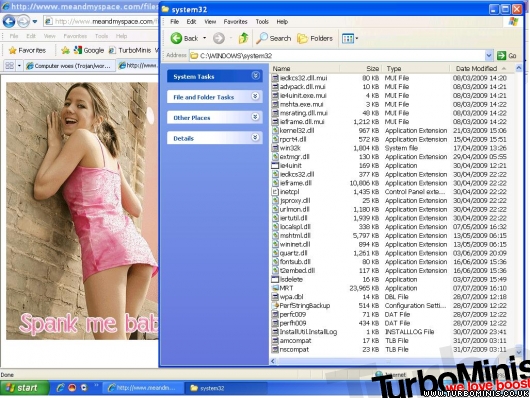
Ive gone into that folder manifold, and sorted by date modified:


and this is whats down at the bottom?

Some of them have perf*** prefixes which may have nothing to do with what you were saying but then again...?

ive never meddled this indepth before, if i delete the wrong things in here, will it break my pc?

"Turbo's make torque, and torque makes fun"

"did you know you can toast potato waffles?"


joeybaby83

User Avatar

6274 Posts
Member #: 509
Post Whore

Isle of Man

oh, and how do i find those hidden files?

Cheers again

Joe

"Turbo's make torque, and torque makes fun"

"did you know you can toast potato waffles?"


manifold

203 Posts
Member #: 1734
Senior Member

Lancaster

i use the same kind of stuff as you... like spybot, avg and correct registry with a program called winaso.

theres a torrent on TPB for that here:

http://thepiratebay.org/torrent/4732868/Wi...er_4.2_Portable


manifold

203 Posts
Member #: 1734
Senior Member

Lancaster

...on the files do a sort on the top heading 'date modified' look at newest dates first. be careful what you delete lol

....or you will be doing a rebuild anyway!


Carl S
Forum Mod

User Avatar

1927 Posts
Member #: 1761
Stalker

Bristol

Sorry Joe, deleting the wrong system32 files is often a mine field as well. I cant remember the important files off hand but about 95% are needed I think, all with wierd and wonderful names.

Home > Help Needed / General Tech Chat > Computer woes (Trojan/worm/virus in my processes?)
Users viewing this thread: none. (+ 1 Guests)  
To post messages you must be logged in!
Username: Password:
Page: